Your website just failed an accessibility audit. The legal team is sending panicked emails. And somewhere, a user with disabilities can't complete a purchase on your site.
Welcome to the high-stakes world of web accessibility compliance, where good intentions crash into technical realities.
The European Accessibility Act (EAA) and Americans with Disabilities Act (ADA) are legal frameworks that shape whether your website works for everyone . . . or excludes 16 percent of the world's population.
And the "we'll fix it later" approach? It's getting expensive. In 2025, plaintiffs filed 3,117 website accessibility lawsuits in federal court, up 27 percent from the year before.
WebOps teams now face a dual challenge: understanding complex accessibility legislation while translating it into technical implementations. Which ARIA attributes matter most? How do you test for Web Content Accessibility Guidelines (WCAG) conformance at scale? And how do you fix accessibility issues without breaking your site?
Siteimprove customers tell us that clear guidance beats guesswork. That's why Siteimprove.ai helps teams find accessibility issues early, before they turn into compliance problems.
Time to turn compliance headaches into technical solutions. No more guesswork. No more legal panic. Just accessible websites that work for everyone.
The web must be clear. Laws demand it. Siteimprove finds the problems on your pages, and it helps you fix them so you stay right.
Ensure Your Digital Presence is EAA Compliant: Visit our comprehensive EAA Resource Center for essential guides, checklists, and tools to help you navigate compliance and create a more inclusive digital experience.
The European Accessibility Act in a nutshell
The EAA landed on the desks of web teams in 2019. While policymakers celebrated a win for digital inclusion, tech teams scrambled to decipher what "accessibility requirements for products and services" actually meant for their code.
Here's the translation: Since June 28, 2025, the EAA's accessibility requirements apply to covered products placed on the EU market and covered services provided to EU consumers, including e-commerce, banking, e-books, and passenger transport services. Microenterprises that provide services are exempt.
Because the EAA is a directive, each EU member state puts it into effect and enforces it through its own national law.
The technical requirements? The EAA sets functional accessibility requirements in its annexes rather than naming WCAG. In practice, the European standard EN 301 549, which incorporates WCAG for web content, is the main technical route to meeting them. The latest version, EN 301 549 V4.1.1, was published in September 2026 and includes WCAG 2.2. For your website, that means proper heading structures, keyboard navigation, screen reader compatibility, and dozens of other success criteria that most developers weren't taught in school.
Most companies fall into three camps right now: unaware, vaguely concerned, or actively catching up. The obligations already apply, so every month of delay adds exposure.
Key dates you need to know
The EAA has applied since June 28, 2025. Transitional provisions let service providers keep using products they were already lawfully using to deliver services until June 28, 2030. Self-service terminals already in use can stay in service until the end of their economic life, up to 20 years. Smart teams are building EAA requirements into their development cycles now.
Manual testing alone doesn't scale
The real challenge is verification. How do you show your site meets these requirements? Automated scanning catches a significant share of accessibility issues but misses many that need human judgment. Manual testing finds those issues but is hard to scale across thousands of pages.
The Siteimprove.ai Accessibility platform tackles this by combining automated scanning with clear guidance. Technical teams see which elements need fixing, how to fix them, and which issues have the greatest impact. This turns accessibility from a vague requirement into specific changes your team can make today.
Smart solutions beat fines
The penalties for non-compliance aren't trivial. Each EU member state sets its own penalties, which can include fines and orders to withdraw non-compliant products or services from the market. Beyond financial penalties, non-compliant sites risk lasting damage to brand reputation.
For technical teams, the smartest approach combines education with automation. Understanding the WCAG criteria that underpin EN 301 549 gives developers the context for why certain code practices matter. Automated tools then scale that knowledge across your entire web presence.
With Siteimprove.ai, technical teams spend less time hunting for issues manually. Instead, they get prioritized fixes delivered within their existing workflows. Teams that once dreaded EAA requirements can use compliance work to build sites that genuinely serve all users, checking both the legal and usability boxes in one go.
The Americans with Disabilities Act in digital space
Unlike the EAA, the ADA wasn't built for the digital age. It was written in 1990, when websites barely existed, and the law never explicitly mentions the internet. Courts have often applied Title III, which covers places of public accommodation, to websites, but the federal circuits are split. Some require a connection to a physical location, and others don't.
No federal web standard for businesses, but lawsuits anyway
For private businesses under Title III, the Department of Justice still hasn't issued formal web accessibility standards. That leaves businesses facing real legal obligations without a defined technical rulebook.
State and local governments are a different story. A 2024 Title II rule requires their websites and mobile apps to meet WCAG 2.1 Level AA, with compliance dates in April 2027 and April 2028 depending on population size.
In practice, WCAG 2.1 AA has become the benchmark in Title III cases too. Courts and settlement agreements frequently reference WCAG when evaluating whether a website excludes people with disabilities. Your technical teams should treat it as the working standard.
No business is immune. Mom-and-pop shops and Fortune 500 giants alike face lawsuits over basic issues: missing alt text, keyboard traps, and other barriers that lock out users with disabilities.
Where code meets courtroom precedents
The Domino's Pizza case drew national attention in 2019. The Ninth Circuit held that the ADA applied to Domino's website and app because of their connection to its physical restaurants, and the Supreme Court declined to review the decision. The case showed that a business could face ADA liability for its website even without specific federal web regulations.
Your development team needs to understand the technical implications. Missing form labels, inaccessible custom components, and JavaScript that breaks screen readers create real legal exposure. The good news? These issues are fixable with proper guidance.
Technical patterns matter. Screen readers need proper heading hierarchies to navigate content. Keyboard users need visible focus indicators to see where they are on a page. Users with low vision or color blindness need sufficient contrast. The gap between "nice-to-have" coding practices and legal expectations is shrinking fast.
Quick fixes versus lasting compliance
Most companies try one of two approaches when facing ADA compliance concerns. Some hire consultants for a one-time audit and remediation. Others slap on overlay tools that promise instant compliance. Both approaches typically fail.
One-time fixes don't address the ongoing nature of web development. New content, features, and designs create fresh accessibility barriers daily. And overlay tools often create more problems than they solve, with many disability advocates actively opposing them.
Siteimprove.ai takes a different approach, building accessibility checks into the way your team already works. Technical teams receive actionable, prioritized fixes that also show how to prevent similar issues in the future. This sustainable approach builds institutional knowledge while steadily improving accessibility over time.
Technical framework for proactive defense
Smart companies shift from reactive fixes to proactive prevention. This means adopting a technical framework that includes:
- Regular automated testing with live monitoring to catch regression issues
- Development guidelines that require accessibility conformance as a deployment criterion
- Training for developers, designers, and content creators to catch issues early
- Documented processes for addressing accessibility feedback from users
Siteimprove.ai helps technical teams prioritize fixes based on impact, effort required, and risk. Instead of looming legal dangers, accessibility becomes a series of defined technical challenges with checkpoints your team can methodically address.
Technical requirements your website must nail
WCAG 2.2 AA. A short string of letters and numbers that strikes fear into developers' hearts. WCAG 2.1 contains 50 success criteria at Levels A and AA, and WCAG 2.2 raises that to 55, covering everything from keyboard navigation to color contrast. The ADA Title II rule uses WCAG 2.1. The newest version of EN 301 549 uses WCAG 2.2.
Forget the academic language. Here's what WCAG's four principles mean in human speak:
Perceivable. Users must be able to see, hear, or touch your content. That means meaningful images need text alternatives, while purely decorative images should be hidden from screen readers. Videos need captions. Audio needs transcripts. And meaning can't rely solely on visual presentation.
Operable. Users must be able to navigate and interact. Keyboard-only navigation must work. Users need enough time to read and respond before content times out. Nothing should flash in ways that could cause seizures. And WCAG 2.2 adds a minimum size for touch and click targets.
Understandable. Users must be able to comprehend your content and interface. Error messages need to explain what went wrong. Form fields need clear labels. Navigation patterns must remain consistent across pages.
Robust. Content must work reliably with a wide range of browsers and assistive technologies. That means valid, semantic HTML, with ARIA used correctly where native HTML falls short.
Code problems Siteimprove.ai finds
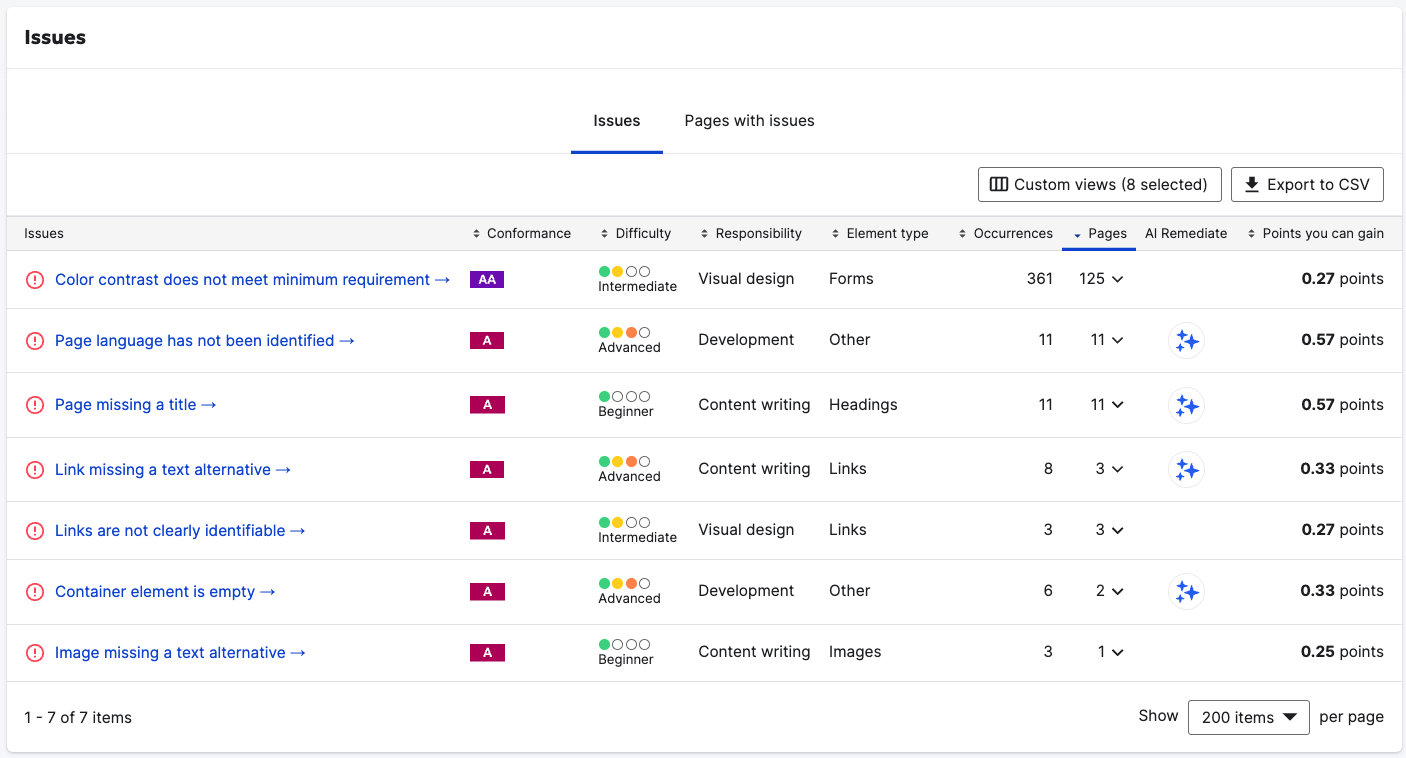
Most accessibility scanners throw up vague alerts like "insufficient color contrast" without telling you which elements fail or how to fix them. The Siteimprove.ai Accessibility product pinpoints the specific elements that need changes.
Common problems include missing form labels that leave screen reader users guessing what information to enter. Empty links that announce "link" without any context. Images missing alt attributes that screen readers can't interpret. And heading structures that skip levels, confusing the document outline.
Siteimprove.ai scans your pages and flags the specific elements that create barriers, with code snippets showing what to fix and why it matters.
From PDF nightmares to form field disasters
Some accessibility problems go beyond basic HTML. PDF documents, a staple of corporate websites, create unique headaches. Most sit on websites like ticking compliance time bombs.
Siteimprove.ai PDF scanning identifies missing document tags, improper heading structures, and untagged images. It also flags complex tables without proper markup and form fields lacking accessible labels.
Custom JavaScript components pose another challenge. Developers build fancy interfaces without implementing basic keyboard support or ARIA attributes. Siteimprove.ai identifies these gaps and provides guidance on making custom controls accessible.
When automated testing meets human intelligence
Not every accessibility issue can be caught by machines. Requirements like "meaningful sequence" and "link purpose" often need human judgment.
Siteimprove.ai combines automated scanning with guided manual testing. Technical teams get step-by-step instructions for checking criteria that need human review. These workflows make manual testing systematic and reproducible, rather than random and inconsistent.
The platform prioritizes issues based on severity, compliance impact, and effort required to fix. This means technical teams can tackle the most critical problems first, showing meaningful progress rather than drowning in an ocean of minor issues.
Your website probably fails dozens of accessibility checks right now. Don't panic. Prioritized fixes accomplish what random repairs never will: keeping your legal team's blood pressure down while letting people with disabilities use your website.
European Accessibility Act vs Americans with Disabilities Act
Both accessibility laws aim for the same goal, equal access, but take different approaches to get there. One emerged in the smartphone era with defined digital requirements, while the other predates the modern internet yet still governs it.
Here's how they stack up against each other when your technical teams need to implement them:
| Aspect | European Accessibility Act | Americans with Disabilities Act |
|---|---|---|
| Legal clarity | Explicitly covers listed digital products and services with defined requirements | Statute is silent on websites; Title III coverage relies on court interpretation, while a 2024 Title II rule sets web standards for state and local governments |
| Technical standard | Functional requirements in the Directive's annexes, supported by EN 301 549 (which incorporates WCAG) | WCAG 2.1 AA under the Title II rule; a de facto benchmark in Title III cases |
| Scope of coverage | Listed products and services, with an exemption for microenterprises that provide services | Places of public accommodation (Title III) and state and local governments (Title II) |
| Documentation requirements | Service providers must publish information on how their service meets accessibility requirements; manufacturers must keep technical documentation and an EU declaration of conformity and apply CE marking | No specific documentation mandated, but advisable for defense |
| Penalties | Set by each member state, including fines and market withdrawal | Private lawsuits seeking injunctive relief and attorneys' fees, with monetary damages available under some state laws (e.g., California's Unruh Act), plus DOJ enforcement |
| Enforcement mechanism | National market surveillance and enforcement authorities | Private lawsuits and DOJ enforcement |
| Geographic reach | Products placed on the EU market and services provided to consumers in the EU | US jurisdictions, but influences global standards |
Turn accessibility headaches into opportunity
Web accessibility isn't optional anymore. The EAA and ADA have seen to that. But meeting your obligations doesn't have to be the technical nightmare many development teams fear.
Savvy organizations embed accessibility requirements directly into their development process, sidestepping the costly cycle of legal interventions and band-aid overlay solutions. So find issues early, before launch, not after your site goes live and attracts legal scrutiny.
Both laws push toward the same goal: making the web work for everyone. WCAG conformance is the technical foundation for both, but neither law treats WCAG alone as proof of legal compliance.
The payoff goes beyond lawsuit prevention. Accessible sites tend to be easier for everyone to use. Navigation becomes more intuitive, content becomes clearer, and the clean, semantic markup that accessibility depends on overlaps with SEO best practices.
Stop treating accessibility as a legal burden. Start seeing it as what it really is: better coding practices that create better websites for all users.
This content is for informational purposes only and does not constitute legal advice. The EAA is implemented through national laws, and ADA obligations differ between Title II and Title III. WCAG is a technical standard; legal obligations vary by jurisdiction and context. Consult qualified counsel for legal guidance.